Floppy opens your old files in the programs that made them.
DOS, classic Mac OS and the Amiga, each in its own emulator, one click away. Floppy is free, always, and this is the only place it's published. Two paid extensions, Diskette and Crunchy, take it further: catalog every drive you own, and clear out duplicates without ever losing the last good copy. For the art scene there's Stylus, free and open source: open, draw and convert ANSI art, SAUCE and all, out now as a public beta. And for anyone who ever dialed into a MUD, there's Coupler, free and open source too: a CoffeeMUD client that makes the game immersive for every player, sighted or not, also out now as a public beta. Everything stays on your computer.
Stylus can draw: type, Pencil, lines, boxes, half-blocks, fills and selections, saved in seven classic formats. Public beta for macOS, Windows and Linux.
Coupler
Meet Coupler, out now
A third free app, and the first you can download today: a CoffeeMUD client that wraps every player in the game, sighted or not, with sound, music and a voice for every character. Public beta for macOS, Windows and Linux.
Crunchy
Undo, with receipts
Crunchy can now undo a Move to Trash or a Smart Move. Every file is checked against the hash the log recorded on its way back, and nothing is overwritten.
Diskette + Stylus
SAUCE in the catalog
Diskette draws a thumbnail of every .ANS, .ICE, .NFO and .DIZ it catalogs and shows the art's SAUCE record. It lists Stylus as a companion app, ready to open.
Crunchy
Smaller audio, same samples
Crunchy's Compress audio makes Opus, FLAC and WavPack files, checks the lossless ones against the original sample for sample, and saves them beside it. Originals are never touched.
Stylus
Meet Stylus
A second free app, open source this time: an ANSI art tool. It opens every classic art format with its SAUCE on show, and turns any image into ANSI 36 ways at once.
Floppy
C:\> with no app
Once a guest is set up, Start DOS boots straight to a C:\ prompt with your whole library as drive C. Classic Mac and the Amiga start the same way.
Diskette
Now playing: a .MOD from 1992
Diskette plays tracker modules and MIDI files with nothing else to install. A Now Playing bar shows what's on, from which drive, and when it ends.
Floppy
Findings teach other Floppys
Drop an Export Findings zip on Floppy and it learns which app versions, file types and setup files worked for someone else. Your own results always win.
Floppy
Setup, minus the scavenger hunt
Floppy now says where to get each ROM and system disk, opens the page, and picks the file up from your Downloads folder by its contents. When it's all there, Burn A CD backs the whole setup up to one disc image.
Floppy
C:\ANSIAPPS\FLOPPY.EXE
Run the old apps your files need, in the OS they were made for.
Free, always
Found a .WP5 from 1991? Floppy keeps a library of your DOS, classic Mac OS and Amiga software and boots each program in the right emulator with one click. Drop an old document on the window and it opens in the program that made it. Free, always, for macOS and Linux.
What's on the disk
DOS, Amiga and classic Mac OS out of the box: DOSBox Staging, FS-UAE and Basilisk II come built in.
Opens old DOS documents in their own apps: WordPerfect, Lotus 1-2-3, dBASE, Deluxe Paint, Turbo Pascal and friends.
Tells WordPerfect 5.1 from 6.0: programs are fingerprinted, versions live side by side, and your favorite opens first.
Keeps score. Say whether a file opened right, and "Open with" ranks apps by what actually worked.
Setup that meets you halfway: it says where to get each ROM and system disk, then picks the download up from your Downloads folder.
No Kickstart yet? Start the Amiga on the free AROS replacement, and Floppy switches to a real one the moment you add it.
Start DOS with no app at all: a C:\ prompt with your whole library as drive C. Classic Mac and the Amiga start the same way.
Drop anything on the window. Floppy works out from its contents whether it's an app, a document or a setup file, and asks only when it could go more than one way.
Burn A CD backs up your whole setup to one compressed disc image, ready to restore on a new computer.
Free software under GPL-2.0-or-later, free of charge for good, with the emulators' source offered alongside every download.
In development · macOS and Linux
Stylus
C:\ANSIAPPS\STYLUS.EXE
Open, draw and convert ANSI art, SAUCE and all.
Free, always
Got a folder of .ANS files from an old art pack? Stylus opens every classic ANSI and ASCII art format, SAUCE record on show, drawn the way the artist saw it, and lets you draw your own with the classic editors' tools. Drop a photo on it and 36 open-source image-to-ANSI converters each turn it into an 80-column .ANS, side by side. Free and open source, and out now as a public beta.
What's on the disk
.ANS, .ICE, .ASC, .NFO, .DIZ, .BIN, .XB, .ADF, .IDF, .TND, .PCB, .AVT, PETSCII, ATASCII and more. Opening never changes the file.
SAUCE always shown: every field, decoded from CP437. A file without SAUCE says so.
9-pixel spacing, iCE colors and aspect ratio, set from the file's SAUCE. Without iCE, blinking text really blinks.
Long ANSIs render all the way down, and match ansilove pixel for pixel on nearly all of 128 scene files tested.
Draw by hand: type at a cursor, Pencil, Line, Rectangle, Box, a half-block brush and Fill, with F-key character sets and undo by stroke.
Select, cut, copy, paste (transparent too), move and flip, with ▌▐, ▀▄ and box corners mirrored.
Save in ANSI, plain text, XBin, BIN, Artworx, iCE Draw and TundraDraw, told first what a format would lose, with one fresh SAUCE record. Or export a PNG.
Image to ANSI: 36 converters ported to Rust, all but one matching its original cell for cell, each labeled with its project, license and settings.
No generative AI. Every way Stylus makes art is a plain, repeatable algorithm.
Free and open source under the MIT license, built on icy_tools.
The Mac app is signed and notarized by Apple. The Windows installers aren't signed yet, so SmartScreen warns the first time: More info, then Run anyway.
CoffeeMUD you can hear as well as read: an immersive game for every player, sighted or not.
Free, always
Still remember the rooms of a MUD better than some real ones? Coupler is a client for CoffeeMUD and nothing else, made to pull every player deeper into the game, sighted or not. Play on the game's own 80-column screen, or let Coupler voice it: sound cues, a narrator and a voice for every character, so the world surrounds you instead of scrolling past. Free and open source, and out now as a public beta.
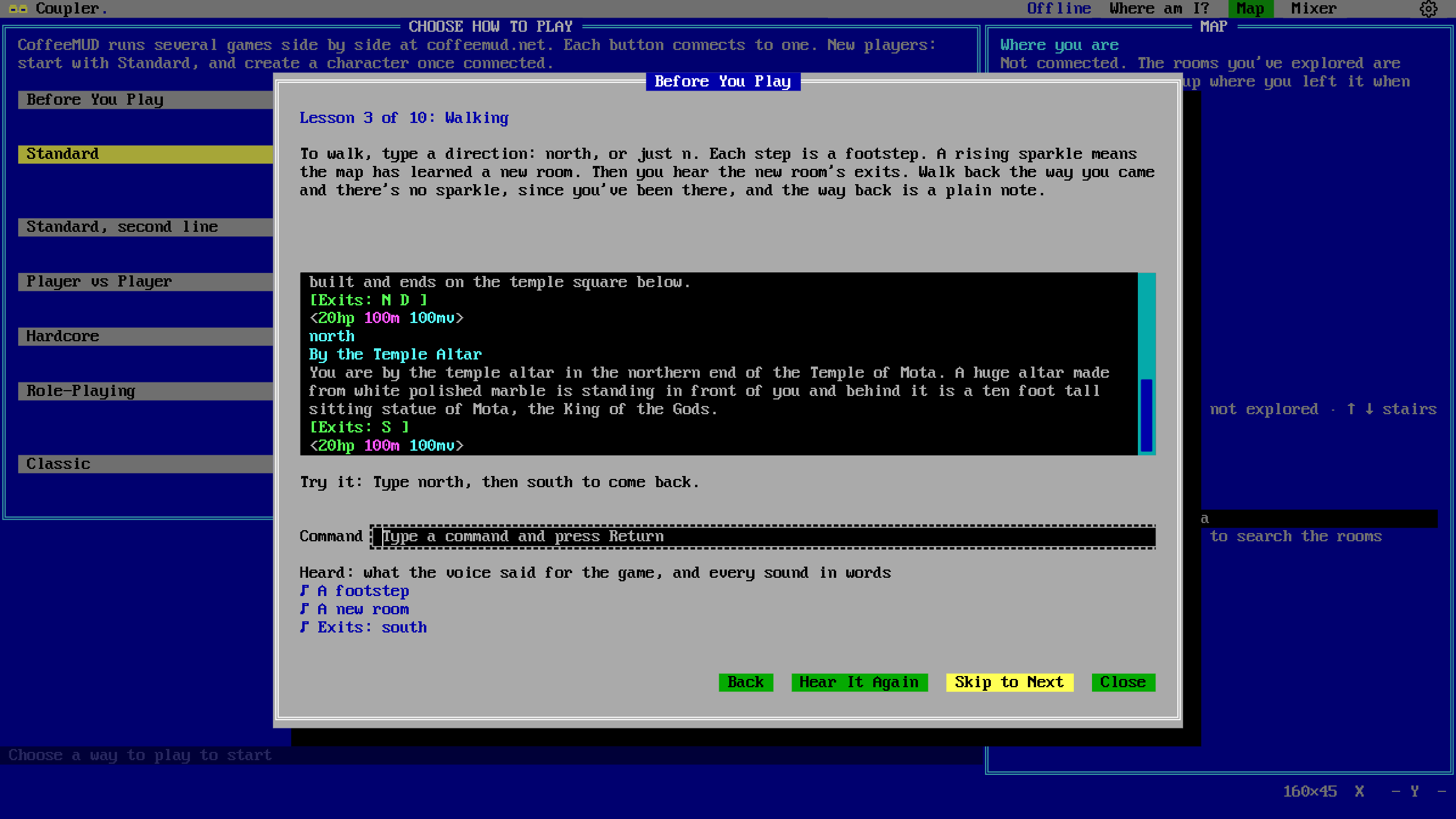
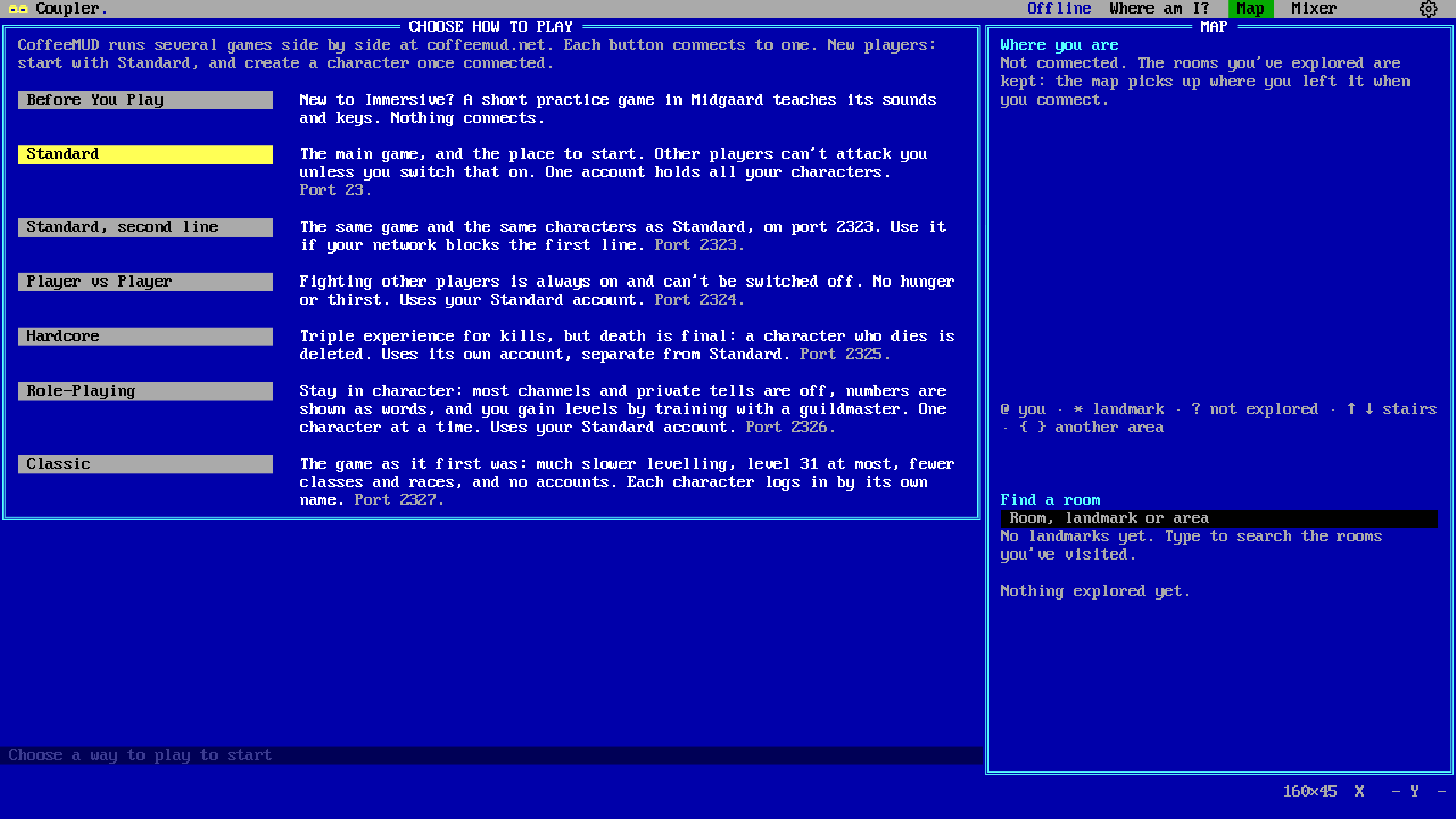
Before You Play: a practice game that teaches Coupler's sounds and keys, every sound written out under Heard. Nothing connects.Choose how to play: every game CoffeeMUD runs, each in a sentence, with the auto-mapper beside it.
What's on the disk
Three ways to play: Terminal (the game's own screen, 80 columns), Immersive (sound first and self-voiced) and Workshop (everything at once, arranged your way).
Open to every player: everything works from the keyboard and with VoiceOver, with review mode, sound captions, readable colors and big text built in.
Speech kept short: what can be a sound is one, and a picture always has the same facts in words beside it.
Hears the game through CoffeeMUD's GMCP and MSDP: vitals, fights, who's talking and where you are, said or played rather than read off the screen.
An auto-mapper from the game's room data, with directions in words and a route walked one step at a time.
Sounds, music, ambience and ANSI art on anything the game reports. Its own synthesizer plays MIDI without a SoundFont.
Composes music and paints pictures from your words, all on your computer, and draws the rooms in ANSI with its own painter.
A journal of everything said to you, kept on your computer.
Talks to CoffeeMUD and nothing else. Checking for updates is off until you turn it on, and then sends GitHub nothing but Coupler's version.
Free and open source under the Apache License 2.0.
The Mac app is signed and notarized by Apple. The Windows installers aren't signed yet, so SmartScreen warns the first time: More info, then Run anyway.
Paid add-ons. Floppy never needs them and never nags about them. Each one runs as its own app, and hands Floppy what it finds.
Diskette
C:\ANSIAPPS\DISKETTE.EXE
Every drive you own, searchable with none of them plugged in.
Paid extension to Floppy
Scan a hard drive, a CD, a USB stick or a folder once, and Diskette keeps a catalog of everything on it, right down to thumbnails of the photos. Years later, find that one file from your desk while the drive stays in its drawer. It's the card catalog your box of disks always deserved.
What's on the disk
Photo thumbnails and a grid view, so you can flip through a drive's pictures with the drive unplugged.
Search more than file names: artist, album, camera, author, year, duration, page count. Try year:1990-1999.
Scans in passes: every file is cataloged fast, then details and thumbnails fill in while you keep browsing.
Looks inside zip, 7z and CAB archives, so a file packed away in 1998 still turns up.
Spots old formats and the apps that open them: MacWrite, ClarisWorks, WordPerfect, tracker music, DOS archivers.
Burn A CD gathers copies scattered across all your drives into one disc image, classic Mac resource forks included.
Plays tracker modules, MIDI, FLAC, Ogg Vorbis, Opus and WavPack with nothing else to install, and a Now Playing bar says what's on.
ANSI art gets a thumbnail drawn from the art, and its SAUCE record in Details. Try artist: to find a piece by who drew it.
Live catalogs: folders on your startup disk are checked for changes at every launch, and a light says whether the catalog is still current.
In development · macOS first
Crunchy
C:\ANSIAPPS\CRUNCHY.EXE
Find duplicate files, prove they're identical, reclaim the space safely.
Paid extension to Floppy
Nine copies of the same photo backup across four drives? Crunchy finds them, proves they match with BLAKE3 hashes, and moves the extras to the Trash. Then Smart Move folds that stray backup into your master copy without clobbering a thing. It will never let you throw away the last copy. Every archivist has a story about the last copy.
What's on the disk
Smart Move merges an incoming folder into your master copy. It plans every move first and changes nothing until you say so.
Never overwrites: across disks, each copy is re-hashed against its original before the original goes to the Trash.
Size first, then a sample, then a full hash: nothing is called a duplicate until it's proven.
Respects classic Mac files: resource forks and type/creator codes are flagged, never auto-selected.
Understands APFS clones, so the space it promises is space you actually get back.
Undo: a Move to Trash or a Smart Move can be taken back, every file checked against the hash the log recorded.
Compress audio: Opus, or lossless FLAC and WavPack checked against the original sample for sample, saved beside it, never over it.
Pairs with Diskette to show copies on drives that aren't even plugged in.
In development · macOS first, runs on Linux too
Floppy, Stylus, Coupler, plus two extensions
Floppy works on its own. Add the extensions and they cover the whole trip, from a forgotten drive to a file opened in the program that made it.
Diskette catalogs every drive, disc and folder you own, once.
Floppy asks Diskette for the ROMs, system disks and old apps it's still missing. Diskette burns every copy you have to a disc image and hands it straight back, and Floppy keeps an undamaged one.
Crunchy shares hashes with Diskette, so duplicates show up across all your drives, even the ones in the drawer. Smart Move then folds the strays into your master copy.
Stylus is for the other thing those old disks hold, because text mode was never just text. Eighty columns, sixteen colors and a character set built for box drawing were enough for a whole art scene, with its own artists, styles and masterpieces. Stylus shows each piece the way its artist drew it, SAUCE and all, and lets you draw the next one.
Coupler goes back online, to the text worlds people telnetted into in eighty columns. It makes CoffeeMUD something you step into, with sound cues, music, a narrator and a voice for every character, whether you play by eye, by ear or both.
House rules
Floppy, Stylus and Coupler are free, always
No price, no trial, no paid tier. Floppy is free software under the GPL, published only here, with its source and the emulators' source a click away. Stylus is open source under the MIT license, and Coupler under the Apache License 2.0.
Your files stay home
No accounts, no cloud, no telemetry. Not even this page sets a cookie.
Old formats are first-class
Resource forks, type/creator codes, 8.3 names and HFS disks are handled with care, not stripped.
Two looks, same app
A modern theme, and an ANSIapps theme straight out of a DOS box. Tick the box at the top of this page to try it.
Made to be kept
Catalogs export to a single backup file. The whole point is that things last.
Coming soon to a disk drive near you
Coupler and Stylus are out, as public betas for macOS, Windows and Linux: their download buttons always point at the latest build. Floppy is in active development for macOS and Linux, and will be a free download right here. Diskette and Crunchy, Floppy's paid extensions, are in development as well, macOS first. Releases will be announced on this page. Keep your disks dry until then.